¶  What Is Proxmox Backup Server?
Proxmox Backup Server (PBS) is an enterprise backup solution for VMs, containers, and physical hosts. It uses incremental, fully deduplicated backups to dramatically reduce network load and save storage space, and it adds strong encryption and integrity checks so you can feel safe backing up to targets you don't fully trust.
Using PBS is almost always better than backing up Proxmox VMs directly to a TrueNAS NFS share. Instead of saving full VM images every run, PBS stores data in chunks and only uploads blocks that changed — which means faster backups, smaller storage footprint, and easy daily scheduling even across many similar VMs. On top of that, PBS gives you things NFS backups simply don't have: built-in encryption, automatic verification to detect corruption, flexible retention policies (daily / weekly / monthly), and fast disk-level and file-level restores directly from the Proxmox UI. You can still put the backing storage on TrueNAS — you just get a lot more on top.
¶ 1 · Install PBS
 TrueNAS 26 LXC
- Download the latest ISO from the official Proxmox download page.
- Install it. PBS uses very little — on my machine I give it 1 CPU thread, 2 GB of memory, and a 10 GB hard drive.
- Boot into the web UI at
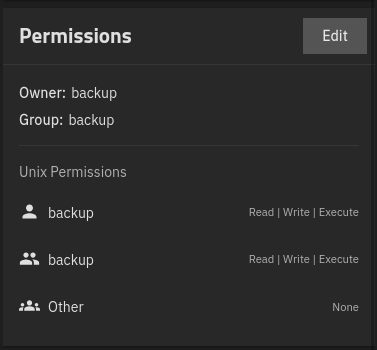
https://{IP}:8007, log in as root with the password you set during install. - On TrueNAS, create a dataset for PBS backups with generic permissions, then change the permissions to user:group
backup:backupwith mode770:
- Create an NFS share from that dataset. Under Advanced Options, set the Maproot User to
root. - In the PBS shell, add the NFS mount to
/etc/fstab(sub in your server IP, path, and mount point):echo "10.99.0.191:/mnt/tank/pbs /backup nfs vers=3,nouser,atime,auto,retrans=2,rw,dev,exec 0 0" >> /etc/fstab - Reboot PBS.
- First time only: go to Virtualization → Containers → Global Configuration and set:
- Preferred Pool = the pool you want container rootfs on
- Bridge = the bridge your LAN is on (e.g.
br1). If you don't have one yet, make one in Network → Interfaces first.
- Create the dataset for PBS backups: Datasets → Add Dataset, parent = your pool, name =
pbs, preset = Generic, save. Leave the default permissions — the next step fixes them. - Open System Settings → Shell and run (sub in your pool):
sudo chown 2147000035:2147000035 /mnt/<pool>/pbs && sudo chmod 770 /mnt/<pool>/pbs - Create the container: Virtualization → Containers → Add
-
Name:
pbs -
Image: browse catalog → debian / trixie / amd64 / default
-
Save
-
Under Filesystem Devices, click Add → Filesystem and fill in:
Field Value Host Directory Source/mnt/<pool>/pbs(the host path)Target/backup(the path inside the container) -
Start the container
-
- Click your container → Shell, and paste this whole block at once:
bash <<'EOF' until getent hosts deb.debian.org >/dev/null 2>&1; do sleep 1; done export DEBIAN_FRONTEND=noninteractive apt update apt install -y ca-certificates wget gnupg curl whiptail KEY=/etc/apt/trusted.gpg.d/proxmox-release-trixie.gpg URL=https://enterprise.proxmox.com/debian/proxmox-release-trixie.gpg wget -qO "$KEY" "$URL" REPO="deb http://download.proxmox.com/debian/pbs trixie pbs-no-subscription" echo "$REPO" > /etc/apt/sources.list.d/pbs.list apt update apt install -y proxmox-backup-server proxmox-widget-toolkit nfs-common IP=$(ip -4 -o addr show scope global | awk '{print $4}' | cut -d/ -f1) echo "PBS URL: https://$IP:8007" EOF - When it finishes you'll see
PBS URL: https://<ip>:8007printed. Set a root password for the PBS web UI:passwd root - Browse to the PBS URL and log in as root with the password you just set.
¶ 2 · Post-Install Script
It is recommended you run the Proxmox Backup Server Post Install Script from helper scripts in the PBS shell using all default options:
bash -c "$(curl -fsSL https://raw.githubusercontent.com/community-scripts/ProxmoxVE/main/tools/pve/post-pbs-install.sh)"
¶ 3 · Create the Datastore
- In the PBS left-hand panel, click Add Datastore.
- Give the datastore a name and set the Backing Path to
/backup(this is where your storage is mounted regardless of whether you're using VM + NFS or LXC + bind mount). - Click Add.
¶ 4 · Create a User for Proxmox
You'll want a dedicated non-root PBS user for Proxmox VE to authenticate with.
- Navigate to Configuration → Access Control in the left pane.
- Click Add and create a new user, leaving all options as default.
- Click the name of the datastore you just created.
- Click Permissions in the top bar, then Add.
- Select the new user and set Role to Datastore Admin.
¶ 5 · Add PBS to Proxmox VE
-
On your Proxmox VE machine, click Datacenter → Storage in the left pane.
-
Click Add and select Proxmox Backup Server.
-
Fill in the fields:
Field Value ID Any name you choose Server The IP of the PBS server (no port number needed) Username The user you created (example: user@pbs)Password The password you chose Datastore The name of the datastore you picked on PBS Fingerprint Go to the PBS Dashboard and click the blue Show Fingerprint button at the top
¶  6 · Connecting With Cloudflare Tunnels
If you're exposing the PBS web UI through a Cloudflare Tunnel, set these under Additional Application Settings while editing your tunnel:
- Turn No TLS Verify to
ON. - Turn Disable Chunked Encoding to
ON.
If you have Bot Fight Mode enabled you must create a rule to bypass your IP.
 Video
Video